# Manual (advanced) setup
Source: https://docs.sisk-framework.org/docs/advanced/manual-setup.html
Use manual setup when you need to assemble the server pieces yourself, such as when one process must expose multiple hosts, ports, routers, or custom server configuration. For most applications, the builder API is shorter and should be preferred. Manual setup is useful when you want direct control over the four core pieces: a `Router`, one or more `ListeningHost` objects, an `HttpServerConfiguration`, and the final `HttpServer`.
First, we need to understand the request/response concept. It is quite simple: for every request, there must be a response. Sisk follows this principle as well. Let's create a method that responds with a "Hello, World!" message in HTML, specifying the status code and headers.
```csharp
// Program.cs
using Sisk.Core.Http;
using Sisk.Core.Routing;
static HttpResponse IndexPage(HttpRequest request)
{
HttpResponse indexResponse = new HttpResponse
{
Status = System.Net.HttpStatusCode.OK,
Content = new HtmlContent(@"
Hello, world!
")
};
return indexResponse;
}
```
The next step is to associate this method with an HTTP route.
## Routers
Routers are abstractions of request routes and serve as the bridge between requests and responses for the service. Routers manage service routes, functions, and errors.
A router can have several routes, and each route can perform different operations on that path, such as executing a function, serving a page, or providing a resource from the server.
Let's create our first router and associate our `IndexPage` method with the index path.
```csharp
Router mainRouter = new Router();
mainRouter.MapGet("/", IndexPage);
```
Now our router can receive requests and send responses. However, `mainRouter` is not tied to a host or a server, so it will not work on its own. The next step is to create our ListeningHost.
## Listening Hosts and Ports
A [ListeningHost](https://docs.sisk-framework.org/api/Sisk.Core.Http.ListeningHost.md) can host a router and multiple listening ports for the same router. A [ListeningPort](https://docs.sisk-framework.org/api/Sisk.Core.Http.ListeningPort.md) is a prefix where the HTTP server will listen.
Here, we can create a `ListeningHost` that points to two endpoints for our router:
```csharp
ListeningHost myHost = new ListeningHost
{
Router = mainRouter,
Ports = new ListeningPort[]
{
new ListeningPort("http://localhost:5000/")
}
};
```
Now our HTTP server will listen to the specified endpoints and redirect its requests to our router.
## Server Configuration
Server configuration is responsible for most of the behavior of the HTTP server itself. In this configuration, we can associate `ListeningHosts` with our server.
```csharp
HttpServerConfiguration config = new HttpServerConfiguration();
config.ListeningHosts.Add(myHost); // Add our ListeningHost to this server configuration
```
Common server configuration options:
| Property | Default | Use when | Notes |
| --- | --- | --- | --- |
| [RemoteRequestsAction](https://docs.sisk-framework.org/api/Sisk.Core.Http.HttpServerConfiguration.RemoteRequestsAction.md) | `RequestListenAction.Accept` | The service should reject non-local requests unless they come through a trusted reverse proxy. | Set to `Drop` only when your deployment topology is clear. |
| [IncludeRequestIdHeader](https://docs.sisk-framework.org/api/Sisk.Core.Http.HttpServerConfiguration.IncludeRequestIdHeader.md) | `false` | Clients or proxies need the Sisk request id in the `X-Request-Id` response header. | Pair with logs that include `HttpRequest.RequestId`. |
| [IdleConnectionTimeout](https://docs.sisk-framework.org/api/Sisk.Core.Http.HttpServerConfiguration.IdleConnectionTimeout.md) | `120` seconds | Idle keep-alive connections should be closed sooner or later. | This is applied by the HTTP engine. |
| [NormalizeHeadersEncodings](https://docs.sisk-framework.org/api/Sisk.Core.Http.HttpServerConfiguration.NormalizeHeadersEncodings.md) | `false` | You receive headers with an encoding mismatch. | This has a processing cost; leave it disabled unless needed. |
| [SendSiskHeader](https://docs.sisk-framework.org/api/Sisk.Core.Http.HttpServerConfiguration.SendSiskHeader.md) | `true` | You want to hide or expose the `X-Powered-By` Sisk header. | Disable it for stricter production header policies. |
| [OptionsLogMode](https://docs.sisk-framework.org/api/Sisk.Core.Http.HttpServerConfiguration.OptionsLogMode.md) | `LogOutput.Both` | You want to reduce or redirect logs generated by automatic `OPTIONS` handling. | Uses the same log mode values as routes. |
| [AsyncRequestProcessing](https://docs.sisk-framework.org/api/Sisk.Core.Http.HttpServerConfiguration.AsyncRequestProcessing.md) | `true` | You need deterministic single-request processing for diagnostics. | Disabling it limits throughput. |
| [DisposeDisposableContextValues](https://docs.sisk-framework.org/api/Sisk.Core.Http.HttpServerConfiguration.DisposeDisposableContextValues.md) | `true` | Request bag values that implement `IDisposable` should be disposed automatically. | Keep enabled unless ownership is managed elsewhere. |
| [ConvertIAsyncEnumerableIntoEnumerable](https://docs.sisk-framework.org/api/Sisk.Core.Http.HttpServerConfiguration.ConvertIAsyncEnumerableIntoEnumerable.md) | `true` | Value handlers should receive async enumerables as blocking enumerable values. | Disable when you implement your own async-stream handling. |
| [KeepAlive](https://docs.sisk-framework.org/api/Sisk.Core.Http.HttpServerConfiguration.KeepAlive.md) | `true` | Connections should remain reusable after responses. | Disable for clients or intermediaries that do not handle persistent connections well. |
| [ForceTrailingSlash](https://docs.sisk-framework.org/api/Sisk.Core.Http.HttpServerConfiguration.ForceTrailingSlash.md) | `false` | GET routes should redirect to a trailing-slash URL. | Applies only to non-regex routes. |
| [MaximumContentLength](https://docs.sisk-framework.org/api/Sisk.Core.Http.HttpServerConfiguration.MaximumContentLength.md) | `0` | Request bodies need a size limit. | `0` means unlimited until framework or memory limits are reached. |
| [EnableAutomaticResponseCompression](https://docs.sisk-framework.org/api/Sisk.Core.Http.HttpServerConfiguration.EnableAutomaticResponseCompression.md) | `false` | Responses should be compressed automatically when the client supports it. | Existing `CompressedContent` responses are not compressed again. |
Next, we can create our HTTP server:
```csharp
HttpServer server = new HttpServer(config);
server.Start(); // Starts the server
Console.ReadKey(); // Prevents the application from exiting
```
Now we can compile our executable and run our HTTP server with the command:
```bash
dotnet watch
```
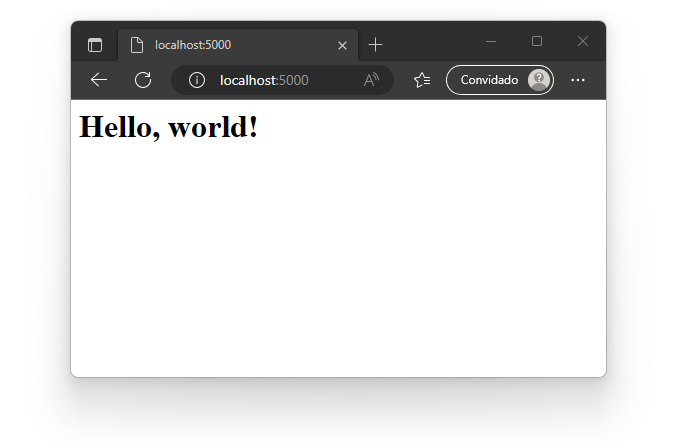
At runtime, open your browser and navigate to the server path, and you should see: